
Gryffin VMS
Visa Management System
Run the expatriate desk as one controlled operation.
Service requests, quotations, invoices, SLA clocks and collections sit on a single record - so a file is never between owners and a fee is never between systems.
- Built for
- Immigration consultancies, corporate expatriate desks, agency networks
- Covers
- Service request to collected fee
- Roles
- Consultant, approver, finance, director, client company
- In the box
- Multi-company, multi-currency, multilingual interface
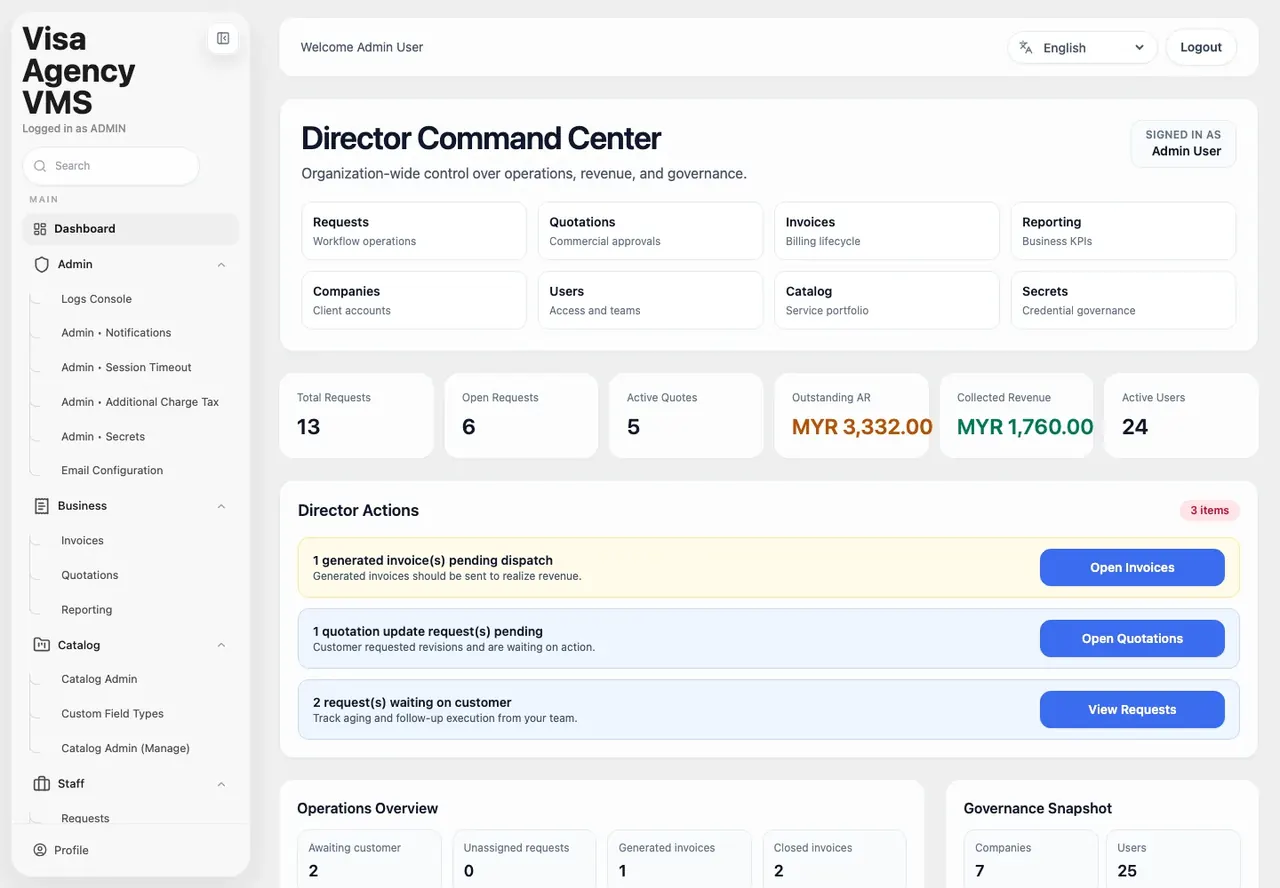
Director Command Center - organisation-wide control over operations, revenue and governance, with the decisions needing attention surfaced first.
The problem
Four systems, one case, nobody holding the whole thread.
An expatriate desk almost never fails on expertise. It fails on handover - the applicant whose document reminder went to a consultant who has moved on, the quotation revised over the phone and never written down, the service delivered in March and invoiced in June.
Spreadsheet
Applicant list, kept current by whoever remembers
Mailbox
Document chases, authority circulars, submission confirmations
Shared drive
Scanned passports and dossiers, named by hand
Accounts
Finds out what was sold once the work is already done
Lifecycle
Every request on the same track, with an owner and a clock.
Stage, consultant and age are properties of the request, not of somebody's memory. Work that stops moving surfaces on the director's screen before a client raises it.
- 01
Request raised
Company, service and consultant captured against the priced catalogue.
- 02
Document verification
Checklist per service; missing items chased before anything is lodged.
- 03
Ready for submission
File complete and cleared to go to the authority.
- 04
With the authority
Lodged and tracked while the authority holds the file.
- 05
Authority decision
Approved, or rejected by authority with the reason on the record.
- 06
Billing and collection
Quotation converted to invoice, dispatched, and followed to payment.
Modules
Five modules, one record.
Each module writes to the same request and the same ledger. Nothing has to be re-keyed from one screen into another.
Module · Requests
The board every request sits on.
Requests are grouped by workflow stage with company, service and consultant on the row, so the current state of the desk is one screen rather than a reconstruction.
- Total, active, approved and rejected counts across the desk
- Tabs for open and pending, priority asks, priority requests and closed work
- Stage per request - document verification, ready for submission, authority decision
- Search by request ID, company, service or consultant, with a date range
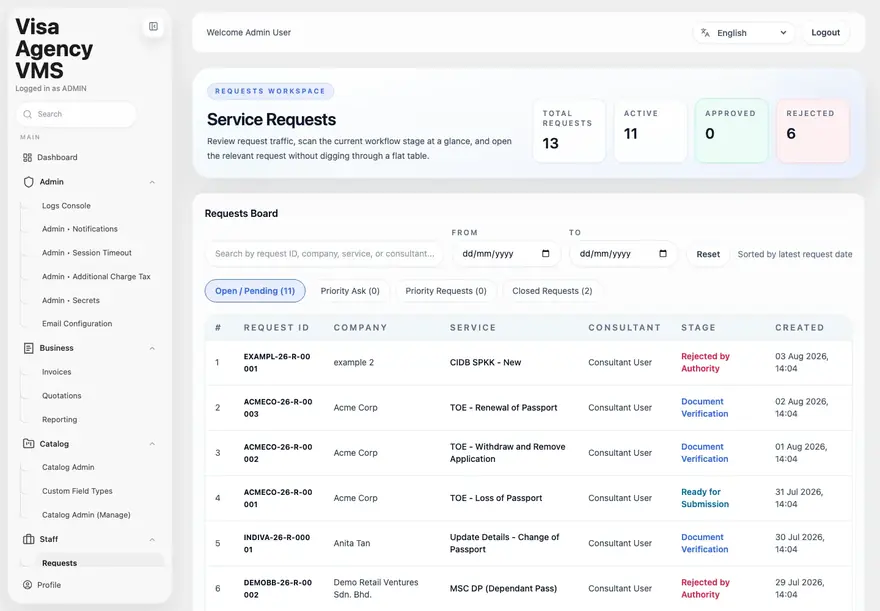
Service Requests - workflow stage at a glance across the whole desk.
Module · Quotations
Quotes that survive their own revisions.
Quotations are built from the service catalogue and carry a customer-facing status of their own, so the desk can see what is drafted, what the client has received, and what is waiting on a revision - without opening a mailbox.
- Open quotations, drafts and needs-update counts on the workspace header
- Pipeline sorted by most recently received, searchable by quotation ID or company
- Customer-facing status - draft, received, requested update
- Lines drawn from the priced service catalogue, not free text
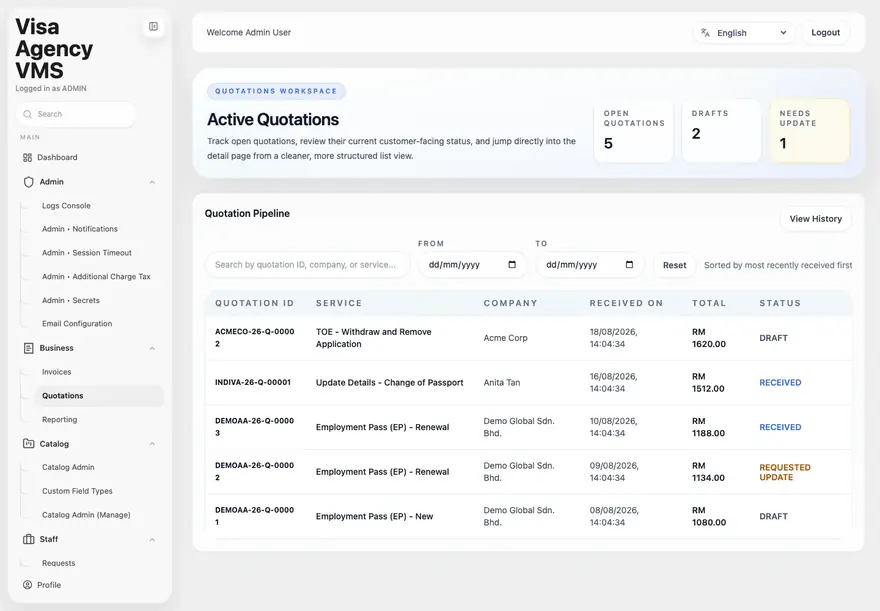
Active Quotations - the pipeline with each quote's current customer-facing status.
Module · Invoices
From approved quote to money in the bank.
The invoice workspace keeps the list focused on what still needs attention. Supplementary billing for later charges is held back while the base invoice is still a draft, so a client is never billed out of sequence.
- Ready-to-generate and generated invoices separated into their own tabs
- Supplementary billing queue for requests carrying unbilled later charges
- Later charges on a draft base invoice held until that invoice is sent
- Filter by company, service and created date to get to a working set
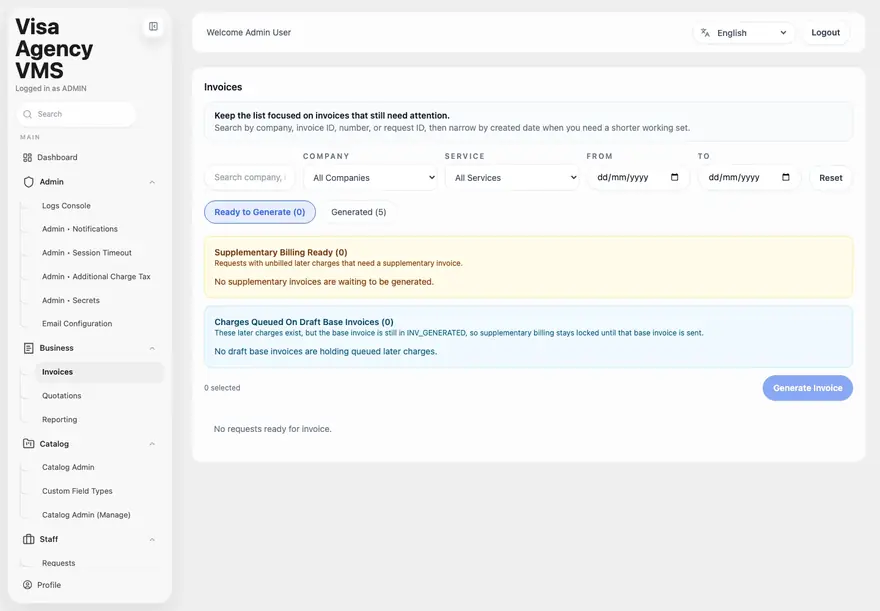
Invoices - supplementary billing stays locked until the base invoice is dispatched.
Module · Reporting
The reporting a director actually opens.
One surface across SLA performance, collections and processing time, scoped by period, service and company. Breaches are split by where they happened, so the fix has an owner.
- SLA breaches split across request, quotation and invoice stages
- Accumulated breach hours, collection rate and average processing time
- Collected and outstanding value in scope, with rejections recorded
- Written insights alongside the figures, and CSV export on the view
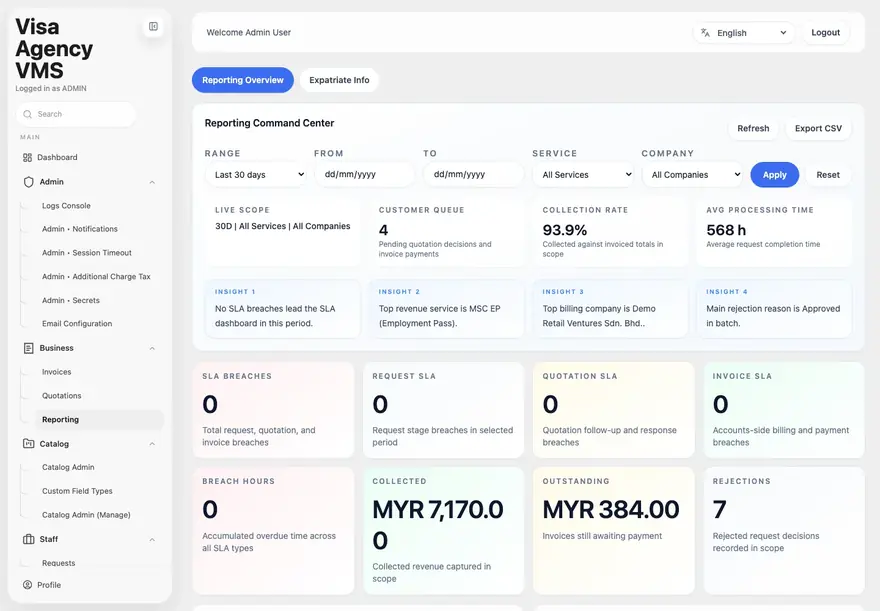
Reporting Command Center - SLA, collection and processing performance for the selected scope.
What changes
The arguments that stop recurring.
Nothing sits unowned
Every request has a named consultant at every stage, and work that stops moving appears on the director's screen the same day rather than at the month-end review.
One trail from enquiry to receipt
The quotation, the invoice and the payment carry the same references as the request, so reconciling what was sold against what was delivered stops being a manual exercise.
An audit-ready file, by default
Document versions, approvals, authority decisions and status changes are written as they happen, with user and timestamp, and export as a single case history.
Delivery
How it is deployed and supported.
Gryffin Global delivers this as an implementation, not a download. Configuration to your own process is part of the engagement.
- Deployment
- Cloud or customer on-premise
- Tenancy
- Multi-company, with client accounts scoped to their own requests
- Interface
- Multilingual - language selected per user
- Catalogue
- Priced service catalogue with custom field types per service
- Tax
- Configurable additional-charge tax rules applied at quotation
- Access control
- Role-based, with a governed store for credentials and secrets
- Notifications
- Configurable e-mail templates, session timeout and alert rules
- Audit
- Logs console across requests, quotations, invoices and user activity
Bring the expatriate desk onto one record.
We will walk through VMS against your own service catalogue and show what the first ninety days of migration looks like.
We respond within 12 hours